
IoT devices typically transmit data over a long distance with limited power available. LoRaWAN protocol is design for this purpose. It also brings other advantages such as
- Scalability: LoRaWAN networks can support millions of devices, making it suitable for wide-scale deployments.
- Security: LoRaWAN has built-in encryption and security at the network and application layers. This ensures that data transmitted between devices and the network server is secure.
Recently, I’ve had some fun playing with some IoT devices and looking closely into how the payload can be encoded and decoded. This article is meant to focus on the payload decoding. However, it is good to give an overview the setup as background information.
The system setup consists of the following main components.
- Weather station set up to collect 8 metrics.
- Helium Network setup for collection raw data
- Data Parsing and Machine Learning Model Building on Colab
- Model Deployment on www.pythonanywhere.com

Data is collected through 8-in-1 weather station. Purchased from Seeed Studio.

It collects the following metrics:

Data is transmitted through Helium Network and collected into Google Sheet.

This is an example of debug payload on the Helium console:

The payload is base64 encoded. For example, the string AQEwQAAAJVYAAAg= when decoded into Hex it is:
01 01 30 40 00 00 25 56 00 00 08
It carries the actual weather data we are collecting such as temperature, humidity, wind speed etc. The encoding logic is defined by the product provider, and is shared in JavaScript code: S2120-Helium decoder. In my project, I need to convert the JavaScript code into Python for Machine Learning model building. That process allowed me to understand the logic in-depth.
Data is interpreted in the following structure:
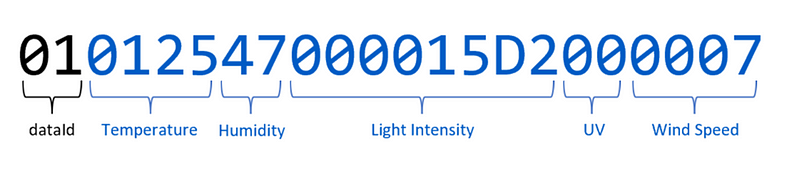
The dataId at the beginning determines the type of data the subsequent numbers encode.
If dataId=01, the subsequent numbers encode Temperature, Humidity, Light Intensity, UV Index, and Wind Speed.
If dataId=02, the subsequent numbers encode Wind Direction, Rain Gauge, and Barometric Pressure.
The tables below illustrate how the numbers are decoded layer by layer following the logic.

 Blogging Tom